
ZSHAND
High-performance Zsh framework for developers who don't wait.
OMZ plugins · ZSHAND plugins · widgets · hooks — fast or deferred.
Override anything. Have your .zshrc and source it too.
❯ health
✓ startup  <50ms  · 11 modules · 10 hooks deferred
✓ widgets  20 bound  · lazy stubs · 1ms each
✓ bundle   1 .zwc  · 100+ files compiled
✓ tools    70+ installed  · pkgsync verified

❯ zr
✓ recompiled in ~1s

❯ zprofile --report
  1. 12ms  hooks/01_mise.zsh
  2.  8ms  core/20_plugins.zsh
  3.  4ms  core/18_hooks.zsh
⚡ Why ZSHAND?
import-ohmyzsh-plugins. → Import Guide .zwc bytecode, inlined with the framework. Same treatment as core. → Your Config -
<50ms Cold Start
P10k instant prompt + compiled
.zwcbytecode. 100+ source files → 1 bundle viazmono. Your config compiled in too viazfull. -
Import OMZ / P10k / Prezto
One command each:
import-ohmyzsh-plugins,import-p10k-theme,import-prezto-themes. Bring your setup — don't start over. -
Override Without Forking
Drop
05_my_module.zshinrc.d/— it loads between04_pathand06_engine. Override any core module, widget, hook, or function. Zero patching, zero forks. -
Self-Healing Shell
3 failures → Safe Mode auto-triggers: recovery menu, minimal PATH, one-command fixes.
health+ztopdashboards. PATH auto-heals. -
Auto System Setup
packages.tomldeclares every tool, language, and app. Fresh machine? Onecloner.shrun installs 70+ tools, sets up SSH/GPG, and compiles the framework.pkgsynckeeps it all in sync. -
20+ Keyboard Widgets
AI commit (Ctrl+B), fuzzy file picker (Ctrl+T), man page search (Alt+M), git branch picker, and more — all lazy-loaded, compile on first keypress.
-
Auto-Generated Docs
Every file has structured headers.
docgengenerates source docs + Mermaid dependency graphs from framework and your files.aicontextexports for Cursor/Windsurf/Claude. -
AI-Native Workflow
aicmitgenerates commits from diffs.aidebugbuilds error-diagnosis prompts.pastemsmart-pastes AI responses. Project manifests viaaicontext.
🔩 Under the Hood
.zwc bundle.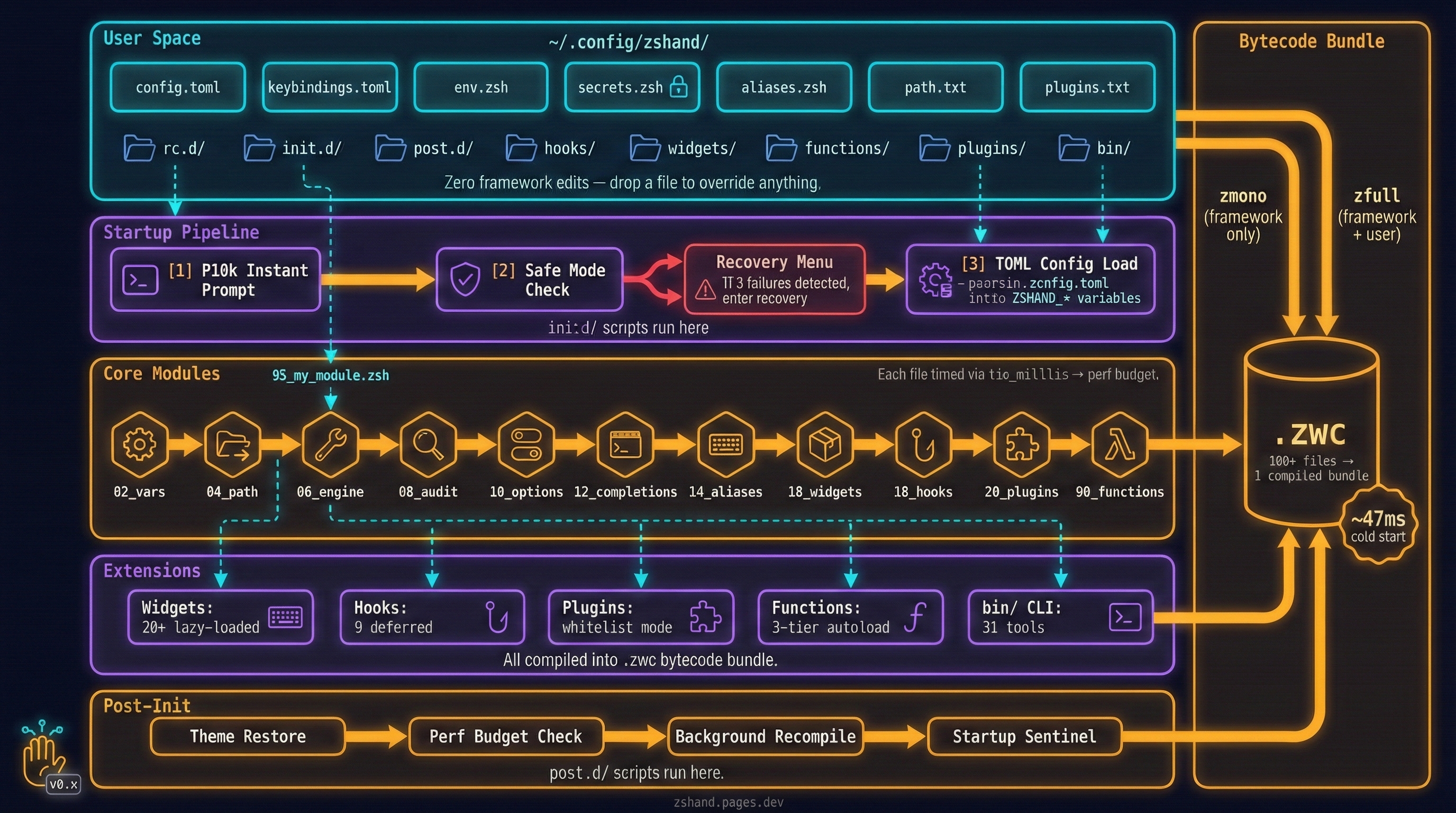
🚀 Quick Start
-
Setup
1. Clone & bootstrap — detects your OS, installs 70+ tools, sets up SSH/GPG keys, writes shell profiles, and compiles the framework:
Supports Debian, Manjaro, macOS, WSL. Flags:
--dry-run,--update,--uninstall.2. First run — interactive setup wizard:
3. Choose your mode — pick how ZSHAND runs:
~/.config/zshand/config.toml[framework] # Fast mode (default) — compiled bytecode dev_mode = false auto_full = true # auto-recompile on changes perf_budget = 5 # warn if any file > 5ms # Dev mode — raw source, instant edits # dev_mode = true4. Secrets — auto-secured with
chmod 600every startup: -
Basic Usage
After install — verify and start using:
Compile — run after any edit:
zr                    # quick recompile (~1s)
zfull                 # framework + your config (~3s)
zfresh                # clean rebuild + restart (~4s)
zupdate               # full maintenance cycle
Profile — find what's slow:
zprofile              # instrumented profiling
zprofile --report     # last timing report
ztop                  # live framework dashboard
Import — bring your existing setup:
import-ohmyzsh-plugins  # OMZ plugins → ZSHAND
import-p10k-theme       # your .p10k.zsh config
import-prezto-themes    # Prezto themes
Just recipes —
just --listfor all:Add your own recipes in
~/.config/zshand/justfile— they're auto-included.
📊 How ZSHAND Compares
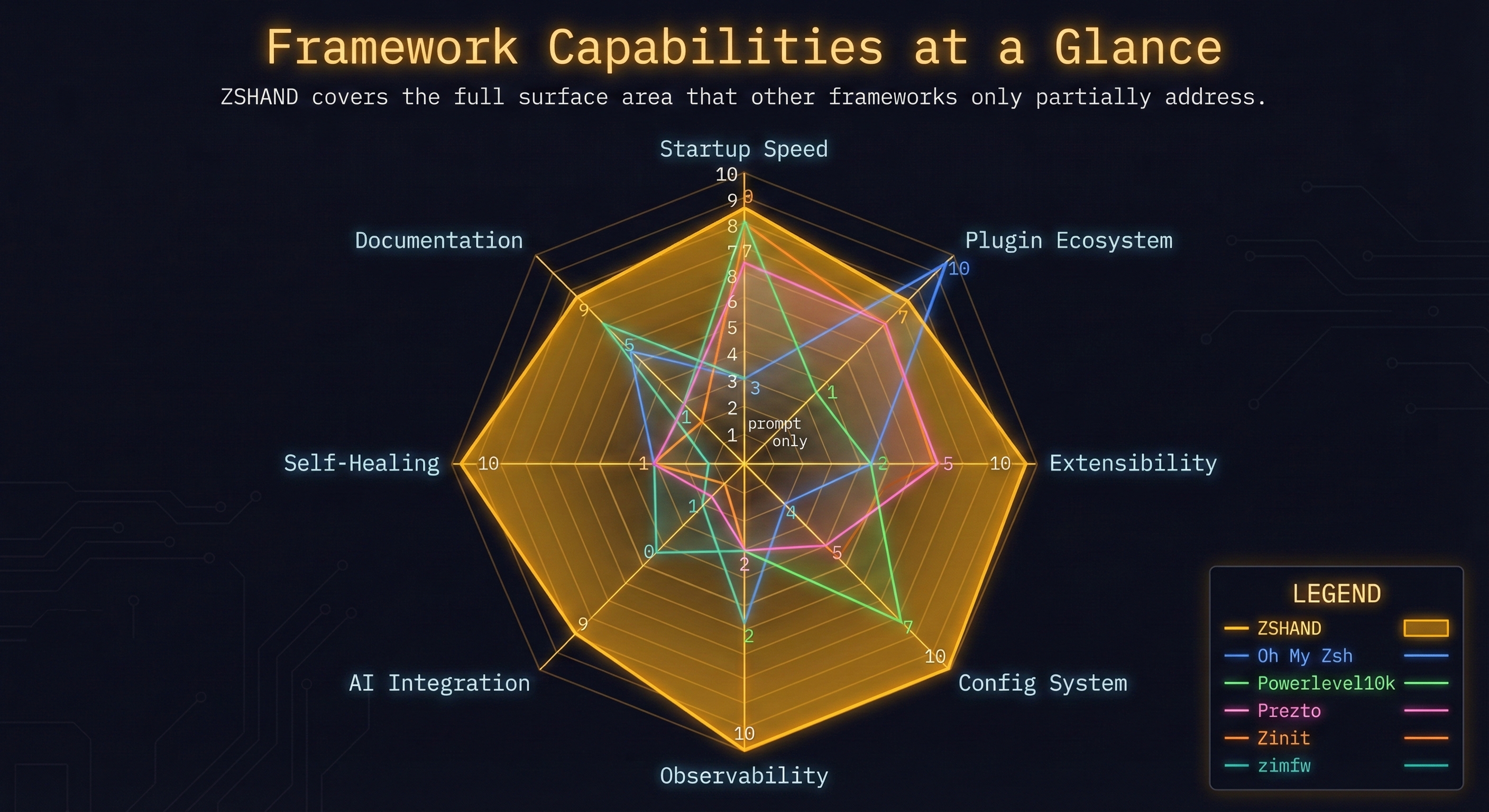
.zsh file. .zwc bundle. Project Overview
| Feature | ZSHAND | OMZ | P10k | Prezto | Zinit | zimfw | Antigen | zplug | sheldon | bash-it | oh-my-bash |
|---|---|---|---|---|---|---|---|---|---|---|---|
| Type | Full framework | Full framework | Prompt theme | Full framework | Plugin mgr | Module mgr | Plugin mgr | Plugin mgr | Plugin mgr | Full framework | Full framework |
| Shell | Zsh | Zsh | Zsh | Zsh | Zsh | Zsh | Zsh | Zsh | Zsh+Bash | Bash | Bash |
| GitHub stars | Private | 175k | 46k | 14k | 2.9k | 3.8k | 7.9k | 5.8k | 1k | 14k | 5.9k |
| Status | Active | Active | Archived | Slow | Active | Active | Unmaintained | Unmaintained | Active | Active | Active |
| Written in | Zsh | Zsh | Zsh | Zsh | Zsh | Zsh | Zsh | Zsh | Rust | Bash | Bash |
| Config format | ↗ TOML | Shell | Shell | Shell | Shell | Shell | Shell | Shell | ↗ TOML | Shell | Shell |
Performance & Loading
| Feature | ZSHAND | OMZ | P10k | Prezto | Zinit | zimfw | Antigen | zplug | sheldon | bash-it | oh-my-bash |
|---|---|---|---|---|---|---|---|---|---|---|---|
| Cold start | <50ms | 200-400ms (no compile) | N/A (prompt only) | 80-150ms | 50-100ms (ice tuned) | 40-80ms | 300-500ms (re-parse) | 200-400ms (re-parse) | 30-60ms (Rust loader) | 200-500ms | 150-300ms |
| Bytecode bundle | 100+ files → 1 ↗ .zwc | No | No | No | No | No | No | No | No | No | No |
| Auto-compilation | Detects stale, ↗ recompiles per-dir | No | No | No | ↗ ice compile | ↗ compile | No | No | No | No | No |
| Lazy loading | Each function/widget ↗ on first call | No | N/A | ↗ Partial | ↗ Turbo | ↗ Partial | No | ↗ Deferred | ↗ Yes | No | No |
| Async ops | Hooks run ↗ after prompt renders | No | N/A | No | ↗ Turbo | No | No | No | No | No | No |
| Profiling | zprofile — ranks ↗ slowest files | No | No | No | ↗ zpmod | No | No | No | No | No | No |
Configuration & Extensibility
| Feature | ZSHAND | OMZ | P10k | Prezto | Zinit | zimfw | Antigen | zplug | sheldon | bash-it | oh-my-bash |
|---|---|---|---|---|---|---|---|---|---|---|---|
| Override w/o fork | Drop file in ↗ rc.d/, it wins | No | No | ↗ Partial | No | No | No | No | No | ↗ Partial | No |
| TOML config | Declarative ↗ config, no shell code | No | No | No | No | No | No | No | ↗ Yes | No | No |
| Load order ctrl | 05_foo.zsh — number ↗ sets priority | No | No | No | No | No | No | No | No | No | No |
| Import frameworks | One cmd ↗ imports OMZ/Prezto | Native | No | Native | ↗ Partial | ↗ Partial | ↗ OMZ | ↗ GitHub | ↗ GitHub | No | ↗ OMZ |
| 3-tier functions | Core → plugin → yours (↗ last wins) | Plugins | N/A | ↗ Modules | No | No | No | No | No | No | No |
| Custom plugins dir | Own dir, ↗ profiled + compiled | ↗ Yes | N/A | Yes | ↗ Yes | Yes | No | No | No | ↗ Yes | Yes |
| Themes | P10k built in + ↗ customizable | ↗ 150+ | Native | ↗ 30+ | No | No | No | No | No | ↗ 60+ | ↗ 50+ |
Built-in Features
| Feature | ZSHAND | OMZ | P10k | Prezto | Zinit | zimfw | Antigen | zplug | sheldon | bash-it | oh-my-bash |
|---|---|---|---|---|---|---|---|---|---|---|---|
| Functions | 31 ↗ shell functions | ↗ ~30 | 0 | ↗ ~20 | 0 | ~10 | 0 | 0 | 0 | ↗ ~20 | ~15 |
| Keyboard widgets | 20+ ↗ bound to keys | 0 | 0 | ↗ 2 | 0 | 0 | 0 | 0 | 0 | 0 | 0 |
| Smart hooks | 10 ↗ hooks, deferred after prompt | ↗ Plugins | N/A | ↗ 6 | ↗ Ice | No | No | ↗ Tags | No | No | No |
| PATH healing | Detects broken PATH, ↗ auto-repairs | No | No | No | No | No | No | No | No | No | No |
| Plugins included | 133+ ↗ source files, all compiled | ↗ 300+ | N/A | ↗ 30+ | No | No | No | No | No | ↗ 70+ | ↗ 50+ |
| Completions | fzf-powered, ↗ compiled in | ↗ 250+ | N/A | ↗ Yes | No | No | No | No | No | ↗ 40+ | 30+ |
Developer Tool Integrations
| Feature | ZSHAND | OMZ | P10k | Prezto | Zinit | zimfw | Antigen | zplug | sheldon | bash-it | oh-my-bash |
|---|---|---|---|---|---|---|---|---|---|---|---|
| mise / asdf | ↗ Deferred load, zero startup cost | ↗ Plugin | N/A | No | ↗ Plugin | No | No | No | No | No | No |
| Docker | Aliases + completions, ↗ auto-loaded | ↗ Plugin | N/A | ↗ Module | Plugin | No | No | No | No | ↗ Plugin | Plugin |
| Atuin history | Replaces Ctrl-R with ↗ fuzzy search | Plugin | No | No | Plugin | No | No | No | No | No | No |
| Git identity | Auto-switches name/email ↗ per repo | No | ↗ Prompt | No | No | No | No | No | No | No | No |
| Per-project env | cd into dir → ↗ tools activate | ↗ direnv | No | No | ↗ Plugin | No | No | No | No | No | No |
| nvm / pnpm / bun | All managed by ↗ mise, one tool | ↗ Plugin | N/A | No | Plugin | No | No | No | No | ↗ Plugin | Plugin |
| Rust / cargo | ↗ mise manages toolchain + PATH | No | N/A | No | Plugin | No | No | No | No | No | No |
| Go | ↗ mise manages version + GOPATH | ↗ Plugin | N/A | No | Plugin | No | No | No | No | No | No |
| uv / pip | ↗ mise manages Python + uv | ↗ Plugin | N/A | ↗ Module | Plugin | No | No | No | No | No | No |
| Linting / fixing | ↗ Trunk — ShellCheck, shfmt, gitleaks, ruff, prettier + more | No | No | No | No | No | No | No | No | No | No |
Shell Enhancements
| Feature | ZSHAND | OMZ | P10k | Prezto | Zinit | zimfw | Antigen | zplug | sheldon | bash-it | oh-my-bash |
|---|---|---|---|---|---|---|---|---|---|---|---|
| Syntax highlight | ↗ Pre-compiled into bundle | ↗ Plugin | N/A | No | ↗ Plugin | ↗ Plugin | Plugin | Plugin | Plugin | No | No |
| Auto-suggest | ↗ Lazy-loaded, no startup cost | ↗ Plugin | N/A | No | ↗ Plugin | ↗ Plugin | Plugin | Plugin | Plugin | No | No |
| FZF integration | Ctrl-R, Ctrl-T, Alt-C ↗ bound | ↗ Plugin | N/A | No | Plugin | No | No | No | No | No | No |
| Clipboard | Paste, yank, history — 5 ↗ widgets | No | No | No | No | No | No | No | No | No | No |
| Dir jumping | ↗ zoxide frecency, replaces cd | ↗ Plugin | N/A | No | Plugin | No | No | No | No | No | No |
| Git aliases | 50+ ↗ aliases: gaa, gcm, gp, gst… | ↗ Yes | N/A | ↗ Yes | No | No | No | No | No | ↗ Yes | Yes |
| Modern CLI | eza, bat, fd, rg ↗ wired in | No | N/A | No | No | No | No | No | No | No | No |
AI & Intelligence
| Feature | ZSHAND | OMZ | P10k | Prezto | Zinit | zimfw | Antigen | zplug | sheldon | bash-it | oh-my-bash |
|---|---|---|---|---|---|---|---|---|---|---|---|
| AI commit | ⌃B: stage, diff, message, ↗ push | No | No | No | No | No | No | No | No | No | No |
| AI debug | ⌃E: captures stderr + context, ↗ suggests fix | No | No | No | No | No | No | No | No | No | No |
| AI context | Exports full shell state ↗ for LLM | No | No | No | No | No | No | No | No | No | No |
| Doc Assist Queue | ↗ docgen parses headers → queues missing docs for AI fill | No | No | No | No | No | No | No | No | No | No |
| Auto Doc Website | ↗ MkDocs site from your code + framework — Mermaid graphs, search | No | No | No | No | No | No | No | No | No | No |
| Debug Assist Queue | Coming soon — AI-triaged error queue from session logs | No | No | No | No | No | No | No | No | No | No |
| Test Fail Queue | Coming soon — failing tests auto-queued for AI diagnosis | No | No | No | No | No | No | No | No | No | No |
Safety, Observability & Documentation
| Feature | ZSHAND | OMZ | P10k | Prezto | Zinit | zimfw | Antigen | zplug | sheldon | bash-it | oh-my-bash |
|---|---|---|---|---|---|---|---|---|---|---|---|
| Safe mode | Broken config? Boots clean, ↗ tells why | No | No | No | No | No | No | No | No | No | No |
| Health check | health — one word, ↗ full diagnostic | No | No | No | No | No | No | No | No | No | No |
| Telemetry | Per-command timing + ↗ resource tracking | No | No | No | No | No | No | No | No | No | No |
| Secrets | Auto ↗ chmod 600 on keys, tokens, env | No | No | No | No | No | No | No | No | No | No |
| Doc Frontend | MkDocs site with ↗ 134 pages, search, Mermaid graphs — your code gets pages too | ↗ README | ↗ README | ↗ README | ↗ README | ↗ README | README | README | ↗ Docs | ↗ README | README |
| Dependency graphs | Auto-generated ↗ Mermaid graphs per file — who calls what | No | No | No | No | No | No | No | No | No | No |
| Update command | zupdate — pull, ↗ recompile, verify | ↗ Yes | N/A | Yes | ↗ Yes | ↗ Yes | No | No | No | ↗ Yes | Yes |
🔄 Startup Pipeline
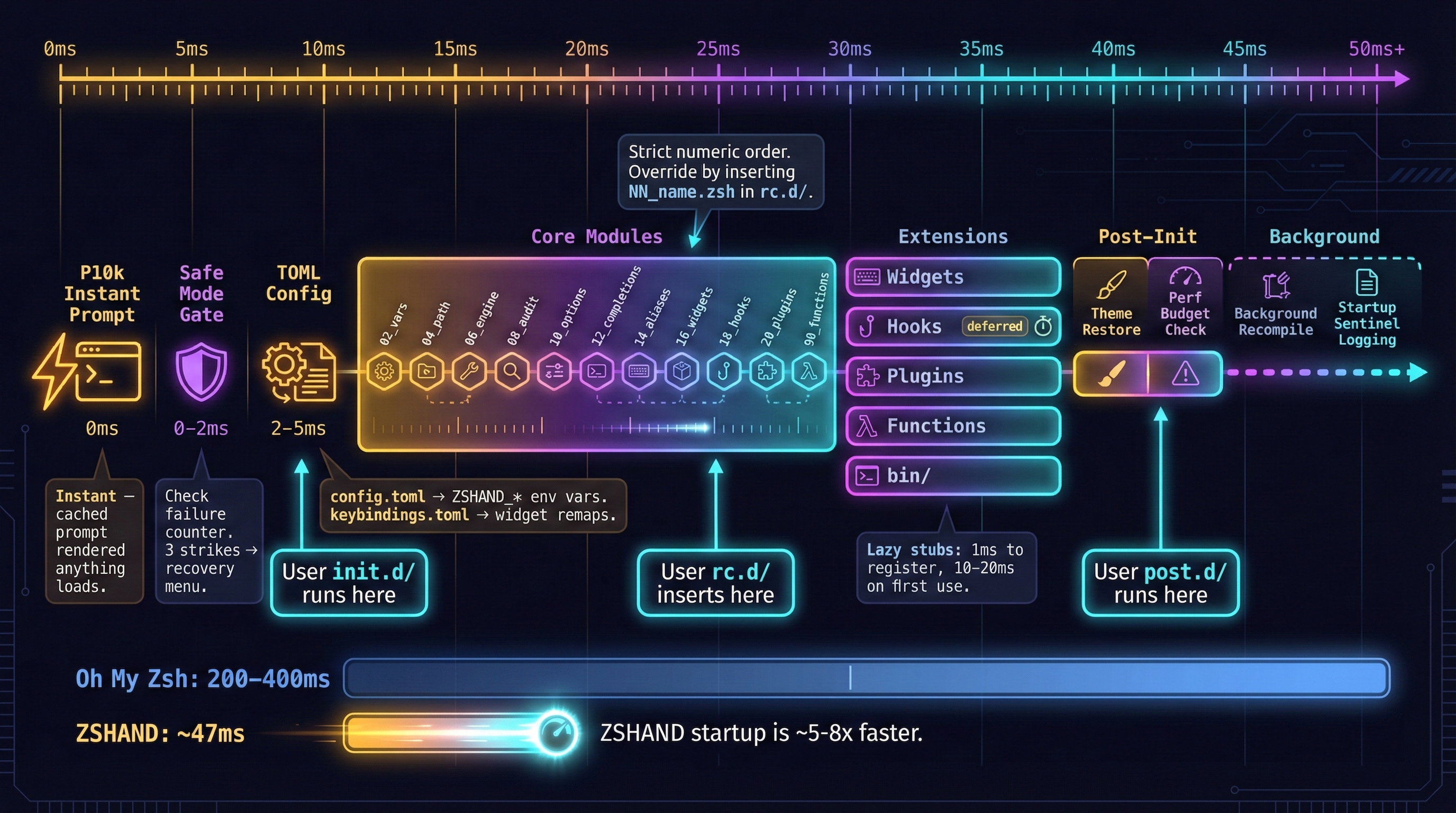
~/.config/zshand/.-
Hook Into Any Stage
Your config directory When it runs Use case init.d/Before core modules Early env setup, PATH fixes, feature flags rc.d/Replaces or inserts into core Override 06_engine, add05_my_modulebetween stepspost.d/After everything Final tweaks, notifications, background tasks hooks/Inside 18_hooksAdd 05_myapp.zshbetween02_atuinand20_dockerwidgets/Inside 16_widgetsOverride or add new keyboard widgets functions/Inside 90_functionsOverride any framework function (highest priority) All directories live under
~/.config/zshand/. -
Key Startup Features
Feature What it does Perf budget Set ZSHAND_PERF_BUDGET=5— warns if any file takes > 5msStale .zwc check Detects when sources are newer than compiled bundles Background recompile auto_full = truerecompiles after first prompt, zero costDev mode dev_mode = trueskips bundles, loads raw source for hackingTOML config Parses config.toml→ZSHAND_*env vars, no shell syntaxTOML keybindings Remap any widget from keybindings.tomlHealth check Validates required tools are installed at startup Startup sentinel Logs completion, tracks failures, feeds Safe Mode
⌨️ Keyboard Widgets
~/.config/zshand/widgets/ — they get lazy-loaded automatically, no config needed. keybindings.toml. -
Inbound (Clipboard/Buffer)
Key Widget Action ⌃ P pastemSmart paste, strip fences ⌥ P pasterawRaw paste, exact format ⌥ H cliphClipboard history picker ⌥ D pjumpProject jump via zoxide -
AI & Outbound
Key Widget Action ⌃ O bufcopyBuffer → clipboard ⌃ G cplastLast output → clipboard ⌃ E aidebugAI diagnose last error ⌃ B aicmitAI commit + push ⌃ K qlogTimestamped note -
Edit & Transform
Key Widget Action ⌃ J jtogJSON pretty ↔ mini ⌃ X bufeditEdit buffer in $EDITOR ⌃ A aliexpExpand alias at cursor ⌥ A aliasfFuzzy alias search ⎋ ⎋ sudotToggle sudo prefix -
Pickers & Search
Key Widget Action ⌥ B bpickBinary picker via fzf ⌥ F fpickFunction picker ⌥ ↵ ctxpickContext: branch, file ⌥ M manfMan page finder ⌥ ? whelpKeybinding reference
🧠 Core Modules
11 numbered modules loaded in strict order. Every module is overridable — drop NN_name.zsh in rc.d/ to replace or insert between any step. Each has a structured header and auto-generated docs.| Module | 🎯 Why | ⚙️ What | 🔧 How |
|---|---|---|---|
02 Variables | Every module needs a shared base | Sets XDG base dirs, log paths, cache root, and a machine-unique ID — all modules read from these | Auto — just works |
04 PATH | Stop $PATH growing into a mess | Builds a deduped, priority-ordered $PATH — Homebrew, cargo, go, pip, local bin, your path.txt | Edit path.txt |
06 Engine | Speed + full observability | Compiles .zsh → .zwc bytecode, records per-command timing telemetry, enforces file permissions | zr to recompile |
08 Audit | Know exactly when things break | Tracks load failures, logs health events, counts consecutive crashes → triggers Safe Mode automatically | health / zcheck |
10 Options | Sane defaults out of the box | Globbing, 50k history with dedup, fuzzy/partial/case-insensitive completion matching, safety options | Override in rc.d/ |
12 Completions | Tab should just work everywhere | Runs compinit, extends $fpath with your dirs, enables fuzzy matching and partial-word completion | Auto — add to fpath |
14 Aliases | Modern CLI tools everywhere | Maps ls→eza, cat→bat, rm→trash, git shortcuts, Docker aliases, pipe aliases — 50+ total | Yours always win |
16 Widgets | Keyboard-driven workflow | Registers 20+ ZLE widgets as lazy stubs — binds keys but defers loading until first keypress | keybindings.toml |
18 Hooks | Integrations without startup cost | Discovers and sources 10 numbered hooks — mise, Atuin, Docker, zoxide, git — all deferred by default | Drop .zsh in hooks/ |
20 Plugins | Use exactly what you want | Loads from plugins.txt whitelist — each plugin gets its own strategy (immediate/lazy/defer/disabled) | Edit plugins.txt |
90 Functions | Your code always wins | 3-tier autoload: user functions/ > private_functions/ > framework — drop a same-named file to override | Drop file in functions/ |
⏱️ Configurable Loading Strategy
plugins.txt to switch.| Strategy | When it loads | Cost | Best for |
|---|---|---|---|
| ⚡ Immediate | Shell init, in numbered order | Full load time | Syntax highlighting, completions, prompt |
| 😴 Lazy | 1ms stub → compiles on first use | 10-20ms on first call | Commands you don't use every session |
| ⏳ Deferred | After first prompt renders | Zero perceived | Heavy integrations, hooks (default) |
| ⛔ Disabled | Never (commented out) | None | Temporarily disable without deleting |
| plugins.txt line | Why | Example | |
|---|---|---|---|
| ⚡ | zsh-syntax-highlighting immediate | Must be ready for first keystroke | zsh-completions immediate |
| 😴 | zsh-autosuggestions lazy | Compiles on first use | my-custom-plugin lazy |
| ⏳ | heavy-integration defer | Loads after prompt renders | my-omz-plugin defer |
| ⛔ | # disabled-plugin | Commented = off, no deletion needed | # slow-plugin defer |
ZSHAND_NO_LAZY=1 forces everything immediate. Useful when a lazy or deferred plugin misbehaves — load it synchronously to see the real error. immediate in plugins.txt. Adds ~20-40ms to startup but everything is ready on the first keystroke. 📁 Your ~/.config/zshand
~/.config/zshand/. The framework never needs editing — updates pull cleanly because your config is separate.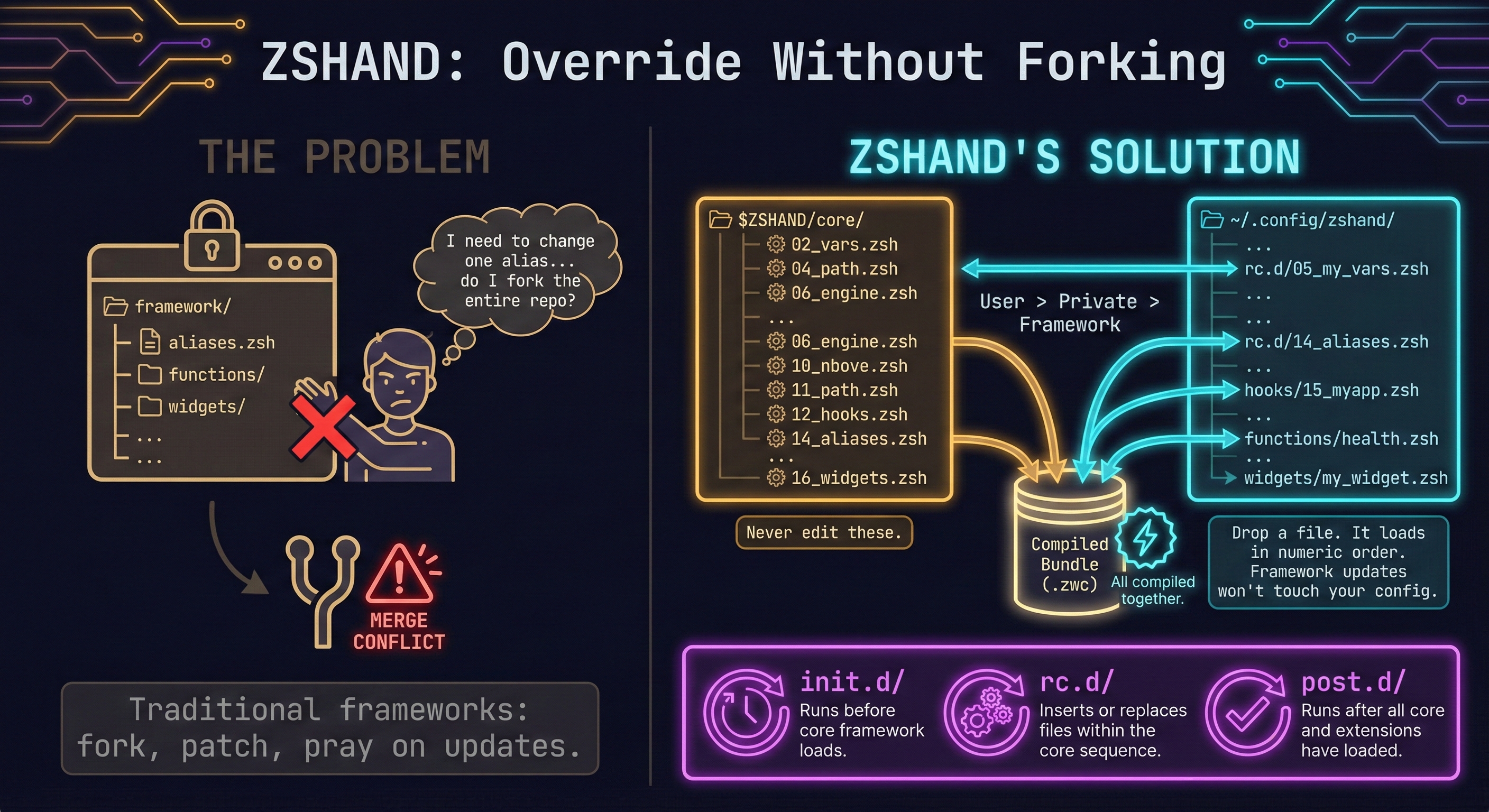
| File / Directory | When | What it does for you | |
|---|---|---|---|
| ⚙️ | config.toml | 1. Early init | Controls the entire framework without shell syntax — dev mode, perf budgets, quiet mode, auto-compile. Parsed into ZSHAND_* env vars before anything else loads. |
| 🌐 | env.zsh | 1. Early init | Your machine-specific environment — EDITOR, BROWSER, proxy settings, FZF_DEFAULT_OPTS. Auto-exported so child processes inherit everything. |
| 🔐 | secrets.zsh | 1. Early init | API keys & tokens loaded before any network-touching code. chmod 600 auto-enforced every startup — even if you accidentally loosen permissions. |
| � | init.d/ | 2. Before core | Runs before any core module — use for early PATH fixes, feature flags, or env overrides that core modules depend on. |
| 🛤️ | path.txt | 3. PATH build | One path per line, no shell syntax. Deduped and priority-ordered — stops $PATH from growing into a mess across shell restarts. |
| 📂 | bin/ | 3. PATH build | Your own CLI tools — automatically added to $PATH. Drop a script here and it's available everywhere. |
| 📂 | rc.d/ | 4. Core load | Override or insert into the core pipeline — 05_foo.zsh loads between 04_path and 06_engine. Full control of ordering. |
| � | aliases.zsh | 5. After core | Your aliases, loaded after framework aliases — yours always win. Override ll, gp, or any built-in alias. |
| 📂 | hooks/ | 6. Hook load | Your tool integrations — numbered alongside framework hooks. Add 05_myapp.zsh to run between mise and Atuin. |
| � | git-identity.conf | 6. Hook load | Persisted git name, email, signing key — survives reinstalls. The gitid hook reads this for multi-identity switching. |
| 📂 | widgets/ | 7. Widget load | Your keyboard widgets — override built-ins or add new ones. Lazy-loaded automatically so they don't cost startup time. |
| ⌨️ | keybindings.toml | 7. Widget load | Remap any widget keybinding in TOML — aicmit = "^G". No need to remember bindkey syntax or edit source. |
| 🧩 | plugins.txt | 8. Plugin load | Whitelist controls which plugins load and how — name strategy per line. Comment a line to disable without deleting. |
| 📂 | plugins/ | 8. Plugin load | Your plugins — drop any .zsh file here and add to plugins.txt. Works with OMZ imports and native sources. |
| 📂 | functions/ | 9. Func load | Highest priority autoload — drop a same-named file to override any framework function. No fork needed. |
| 📂 | post.d/ | 10. After all | Runs after everything is loaded — final tweaks, notifications, background tasks, startup messages. |
-
config.toml
Controls quiet modes, debug flags, performance budgets, dev mode, and plugin strategies. All settings map to
ZSHAND_*environment variables — parsed by16_az_load_toml_config. No shell syntax needed. -
keybindings.toml
Remap any widget keybinding without touching framework code. Parsed by
17_az_bindkey_from_toml. Example:aicmit = "^B"to"^G". -
secrets.zsh
API keys, tokens, credentials. The engine enforces
chmod 600on every startup. Never committed. Coming soon: Doppler and Cloudflare Secrets integration for team/edge secret syncing. -
Config Templates
samples/user-config/ships ready-to-use templates.setup.zshcopies them on first install. Every directory has a README explaining the override pattern.
🔧 Shell Functions
31 functions with 3-tier priority: ~/.config/zshand/functions/ (yours) > private_functions/ > functions/ (framework). Override any function by dropping a same-named file.-
Health & Diagnostics
Function What it does healthFull system check: engine, tools, SSH, git, clipboard, disk ztopLive framework status dashboard zpathPATH audit: duplicates, broken, missing entries pathfixAuto-heal PATH: dedup + remove dead entries zportsList processes using network ports -
Productivity & Git
Function What it does extractUniversal archive extractor (tar, zip, 7z, rar, etc.) seekRecursive content search with ripgrep gitpruneClean up merged/stale remote branches gundoUndo last git commit safely tosshConvert HTTPS remotes to SSH -
Logging & Analytics
Function What it does logstat30-day command analytics: success rate, top commands bootlogView/tail shell init logs zlogSession log viewer: summary, tail, search zwidgetsList all loaded widgets with bindings zhelpSearchable help for all framework commands -
Framework Internals (also available to your scripts)
Function What it does gum_ioBeautiful gum TUI helpers clipboard_copyCross-platform clipboard write clipboard_pasteCross-platform clipboard read time_millisPrecision timing (auto-detects fastest timer) zrunTelemetry-wrapped command execution
🔌 Hooks & Plugins
-
Hooks: Numbered, Deferred, Configurable
10 framework hooks loaded by
18_hooksin numeric order. Each runs deferred after first prompt by default — configurable to immediate, lazy, or disabled. Add yours in~/.config/zshand/hooks/with any number for ordering.Hook Integration What it does 01_misemise Polyglot runtimes: Node, Python, Go, Rust, Bun, pnpm 02_atuinAtuin Encrypted cross-machine shell history sync 05_ssh-agentssh-agent Auto-start agent, add keys, forwarding 20_dockerDocker Completions, aliases ( dps,dclean), context switching30_zoxidezoxide Smart cdwith frecency-based directory jumping40_wranglerWrangler Cloudflare Workers/Pages CLI completions 50_gitidGit Multi-identity SSH/GPG switching per repo 80_archcleanFilesystem Auto-cleanup old archives and temp files 81_wlcleanWayland Clipboard sanitization and leak prevention -
Plugins: Whitelist + OMZ Compatible
Controlled via
~/.config/zshand/plugins.txt— whitelist mode, not load-everything. Each plugin gets its own load strategy (immediate / lazy / defer).Plugin Strategy What it does zsh-syntax-highlightingimmediate Real-time command coloring zsh-autosuggestionslazy Ghost-text suggestions from history zsh-completionsimmediate 1000+ extra completions Your OMZ plugins any Import with import-ohmyzsh-pluginsAny .zshsourceany Drop in plugins/and add toplugins.txt— no wrapper needed
⚖️ Hooks vs Plugins
| 🪝 Hooks | 🧩 Plugins | |
|---|---|---|
| 📍 When | Shell init, numbered order — deferred after first prompt by default | On demand — each plugin chooses: immediate, lazy, or defer |
| 🎯 Purpose | Tool integrations that configure environment: PATH entries, env vars, completions, daemon startup | Standalone feature bundles: syntax highlighting, autosuggestions, OMZ compatibility, custom functionality |
| 📂 Location | ~/.config/zshand/hooks/ | ~/.config/zshand/plugins/ + plugins.txt |
| ⚙️ Control | Numbered filenames (05_myapp.zsh) — ordering by prefix, runs between framework hooks | Whitelist in plugins.txt — each line: name strategy. Comment to disable, no deletion needed |
| 🔌 Examples | mise (runtimes), Atuin (history), Docker (completions), zoxide (cd), git identity (SSH/GPG) | zsh-syntax-highlighting, zsh-autosuggestions, zsh-completions, imported OMZ plugins, any .zsh file |
| ➕ Add new | Drop numbered .zsh file in hooks dir — immediately part of the pipeline | Drop .zsh in plugins dir, add name strategy to plugins.txt — or import from OMZ |
🛠️ CLI Tools (bin/)
45 CLI tools in bin/, all added to PATH. Add your own in ~/.config/zshand/bin/.| Category | Tool | What it does |
|---|---|---|
| 🔧 Build | zr | Recompile everything in ~1s — run after any edit to framework or config files |
| 🔧 Build | zfull | Compile framework + your hooks, widgets, functions, env, secrets into one .zwc bundle (~3s) |
| 🔧 Build | zupdate | Full maintenance: git pull → recompile → update plugins → verify health → restart — one command |
| 🤖 AI | aicontext | Export your entire project context (tree, git state, deps, env) as a structured manifest for Cursor, Windsurf, or Claude |
| 🤖 Dev | scaffold | Generate new widgets, functions, hooks, or bin tools from templates — with headers, tests, and docs pre-filled |
| � Profile | zprofile | Build an instrumented bundle, launch a profiled shell, and get a ranked report of your slowest files |
| 🧭 Nav | zd | Jump to any directory by partial name — 2-char shortcut powered by zoxide frecency |
| 🧭 Nav | ze | Open any file in $EDITOR with fuzzy path completion — 2-char shortcut, no full paths needed |
| � Import | import-ohmyzsh-plugins | Clone OMZ, pick the plugins you want, copy them to your config — they work with ZSHAND's loader immediately |
| � Import | import-p10k-theme | Bring your existing P10k config — it gets compiled into the bytecode bundle for zero-cost loading |
| � Docs | docgen | Parse HEADER_STANDARD from every source file and generate full Markdown doc pages with Mermaid graphs |
| 🖥️ System | pcopy | Copy files with a live progress bar, ETA, and transfer speed — replaces bare cp for large files |
| 🖥️ System | persync | Persistent rsync that auto-retries on failure, resumes where it left off, and respects bandwidth limits |
📡 Telemetry & Observability
# Builds an instrumented .zwc bundle that wraps every file and directory
# load with precision timing. Launches a profiled shell, captures data,
# and generates a ranked performance report.
zprofile              # build instrumented bundle + run profiled shell
zprofile --report     # show last report (no restart)
zprofile --full       # include widgets + hooks profiling
zprofile --rebuild    # force rebuild of profile bundle
zprofile --all        # show all items, not just top 5
zcheck              # last command: exit code, duration, stderr
logstat             # 30-day analytics: top commands, fail rate, patterns
logstat --top 20    # show top 20 most-used commands
zlog summary        # session overview: events, errors, timing
zlog tail 20        # last 20 session events with timestamps
zlog search "fail"  # grep session logs for patterns
bootlog             # per-module startup timing breakdown
💻 Aliases & Modern CLI
Modern Replacements
14_aliases.| Classic | Modern | What you get | Aliases |
|---|---|---|---|
ls | eza | See git status, file icons, and tree view in every listing — know what changed at a glance | ll, lt, la |
cat | bat | Syntax-highlighted output with line numbers and git diff markers — reading code in terminal finally works | cat → bat |
find | fd | 10× faster, auto-ignores .gitignore and hidden files — no more find . -name '*.js' -not -path './node_modules/*' | find → fd |
grep | rg | Smart-case search that skips binaries and respects .gitignore — instant results in huge repos | G pipe alias |
top | btop | Beautiful TUI with CPU, RAM, disk, network graphs — see exactly what's eating resources | top → btop |
man | tldr | Practical examples instead of walls of text — learn a command in 10 seconds, not 10 minutes | help |
diff | delta | Side-by-side diffs with syntax highlighting and line numbers — Git uses it automatically | Git auto-uses |
cd | zoxide | Type z proj to jump to ~/code/my-project — learns from your habits, gets smarter over time | z, zi |
du | dust | Visual disk usage tree sorted by size — instantly find what's filling your drive | du → dust |
ps | procs | Colorized, searchable process list with tree view — find and kill processes without ps aux | grep | ps → procs |
curl | curlie | Curl with httpie-style colored, formatted output — see headers and JSON beautifully | curl → curlie |
Alias Layers
| Category | Layer 1 — Framework | Layer 2 — User |
|---|---|---|
| 📂 Source | 14_aliases.zsh — loaded as core module #14, defines 50+ aliases across all categories | ~/.config/zshand/aliases.zsh — your personal overrides, loaded after all core modules |
| 📍 When | Core module load (step 14 of 16) — after PATH, engine, plugins | After all core modules — guaranteed to override anything in Layer 1 |
| 🧭 Navigation | .., ..., ...., ~, - (previous dir) | Your shortcuts, e.g. alias proj='cd ~/projects' |
| 🔀 Git | gaa, gcm, gp, gco, gst, gl, gd, gb | e.g. alias gp='git push --force-with-lease' |
| 🐳 Docker | dps, dclean, dlog, dexec, dstop | e.g. alias dps='docker ps --format table' |
| 🔗 Pipelines | L (less), G (grep), JQ (jq), H (head) | e.g. alias Y='| yq', alias C='| wc -l' |
| 🛡️ Safety | cp -i, mv -i, rm -i — interactive prompts prevent accidents | e.g. alias rm='rm -rf' (brave mode) |
| ⚡ Priority | Base — always present, never changes | Wins — overrides any framework alias |
📦 Compile & Build System
.zwc bytecode ~5× faster than raw source. Most shell frameworks load raw .zsh files on every startup. ZSHAND compiles everything into bytecode — your shell loads one pre-compiled bundle instead of parsing 100+ files.zr (1s quick recompile) to zfull (framework + your config in one bundle). Run zr after any edit, zfresh for a clean slate, zprofile to find what's slow. auto_full = true in config.toml and forget manual compiles. Detects stale bundles, recompiles after first prompt — zero perceived cost. All your files merged into one .zwc. ZSHAND_PERF_BUDGET=5 to warn if any file takes >5ms. zprofile builds an instrumented bundle and ranks your slowest files. ZSHAND_DEBUG=1 for inline timing. Bytecode Compilation
| Tool | What it compiles | Speed | Result | When to use |
|---|---|---|---|---|
| zr | Framework sources | ~1s | Per-dir .zwc | After editing any file |
| zmono | All → single .zwc | ~2s | One portable bundle | Deployment |
| zfull | Framework + your config | ~3s | Complete bundle | Include user config |
| zprime | Per-directory bundles | Auto | Per-dir .zwc | Runs automatically |
| zfresh | Clean rebuild + restart | ~4s | Fresh shell | Something broken |
| zrebuild | Syntax-validated rebuild | ~5s | Validated bundle | CI / deploy |
| zprofile | Instrumented profiling | ~3s | Timing report | Find slow files |
🔐 Secrets & Security
chmod 600 by the engine on every startup. Never committed to git. Coming soon: Doppler + Cloudflare Secrets integration.📖 Documentation & Guides
| 📐 Architecture & Internals | 👤 User Guide | 🛠️ Developer |
|---|---|---|
| Architecture — 5-layer design, overrides Core Modules — 11 numbered modules Startup Pipeline — P10k to sentinel Auto-Full Mode — auto user-config compile Performance — profiling, perf budgets Build System — .zwc compilation, just | Configuration — config.toml, keybindingsFunctions — 3-tier priority, autoloading Widgets — 20+ keyboard shortcuts Hooks — tool integrations, ordering CLI Tools — 45 commands Safe Mode — auto-recovery Troubleshooting — common fixes | Contributing — PR workflow, standards Style Guide — naming, headers Testing — ShellSpec, CI Security — secrets, Trunk, scanning Shared Functions — 18 internals Private Functions — framework helpers |
🏗️ Installer & Setup
cloner.sh — One-Line Install
bash <(curl -fsSL https://raw.githubusercontent.com/presempathy/zshand/main/cloner.sh)| Step | What happens |
|---|---|
| 1. OS detection | Debian, Manjaro, macOS, WSL auto-detected |
| 2. Prerequisites | Installs gum for beautiful TUI |
| 3. SSH keys | Generates ED25519 keys + GPG signing |
| 4. Git identity | Name, email, signing key — persisted across reinstalls |
| 5. Clone | SSH preferred, HTTPS fallback |
| 6. Shell profiles | Writes .zshrc, .zshenv, .zprofile |
| 7. Packages | Installs 70+ modern CLI tools |
| 8. Compile | Builds .zwc bytecode bundle |
--dry-run, --non-interactive, --update, --uninstall. Compiled single-file via just cloner.OS Packages (70+)
| Category | Why | Tools |
|---|---|---|
| File mgmt | See files with color, git status, icons — instantly | eza, bat, fd, ripgrep, trash-cli |
| Navigation | Jump anywhere by frecency, fuzzy-find everything | fzf, zoxide, tree |
| Git | TUI git, beautiful diffs, PR management from terminal | lazygit, delta, gh |
| System | Monitor CPU/RAM/disk with beautiful TUIs | btop, dust, duf, procs |
| Dev | Polyglot runtimes, fast Python, task runner, JSON | mise, uv, just, jq |
| Network | Pretty curl, DNS lookup, visual ping | curlie, dog, gping |
| Security | Catch leaked secrets and bad shell code before commit | gitleaks, shellcheck, shfmt |
cloner.sh --update anytime to pick up new packages. pkgsync verifies everything is installed — pkgsync --fix installs anything missing.🐳 DevContainer & CI
main and let GitHub Actions handle testing, linting, and deployment.| Area | DevContainer | CI / CD Pipeline | Config |
|---|---|---|---|
| 🏗️ Platform | VS Code, Codespaces, devcontainer CLI | GitHub Actions on push to main | .devcontainer/ |
| 🐚 Shell | Zsh + full framework pre-compiled | ShellSpec tests (Ubuntu + macOS) | spec/ test suite |
| 🔍 Linting | ShellCheck, shfmt, Trunk, ShellSpec | Trunk: ShellCheck, shfmt, gitleaks | .trunk/ |
| 📖 Docs | MkDocs preview on port 8000 | MkDocs build + Mike versioning | just docs-* |
| 🚀 Deploy | zfresh rebuilds in container | Cloudflare Pages deploy | .github/workflows/ |
| 💰 Cost | Free (local or Codespaces) | Free (GitHub Actions) | Timeout guards built in |